

APIToGoAPIToGo
Visit APIToGo on LinkedIn
  • Documentation
  • Components
  • Themes
Quickstart
Configuration
Writing
Concepts
OpenAPI
Authentication
Integrations
Guides
    Static FilesEnvironment VariablesCustom pagesMermaid DiagramsMultiple APIsAPI Keys and IdentitiesNavigation RulesTransforming Operation ExamplesSchema Processors
Deployment
Extending
powered by apitogo
Guides

Navigation Rules

Plugins like the OpenAPI plugin generate sidebar navigation automatically. Navigation rules let you customize that generated sidebar without changing the source. You can:

  • Insert items at a specific position
  • Modify items
  • Sort items with a custom comparator
  • Move items to a different position
  • Remove items

Setup

Add a navigationRules array to your apitogo.config.tsx:

Code
import type { ApitogoConfig } from "@lukoweb/apitogo"; const config: ApitogoConfig = { apis: [{ type: "file", input: "./api.json", path: "api-shipments" }], navigation: [{ type: "link", label: "Shipments", to: "/api-shipments" }], navigationRules: [ // rules go here ], };

Inserting docs

Use type: "insert" to add items before or after a matched sidebar item. The match string uses the tab label as the first segment and navigates into the sidebar tree.

Code
navigationRules: [ { type: "insert", match: "Shipments/0", position: "before", items: [ { type: "doc", file: "api-shipments/getting-started", icon: "plane-takeoff", }, ], }, ],

This inserts a "Getting Started" doc before the first item in the Shipments sidebar.
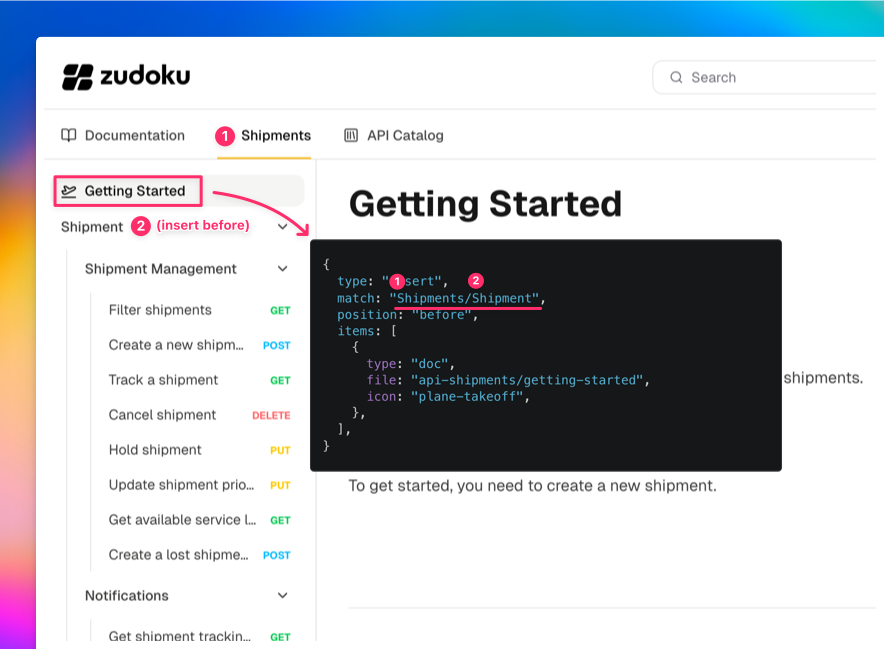
Inserting a doc before the first sidebar item

The MDX file lives at pages/api-shipments/getting-started.mdx (under your configured docs directory, matching the API's base path).

Adding links

You can insert external or internal links the same way:

Code
{ type: "insert", match: "Shipments/-1", position: "after", items: [ { type: "link", label: "System Status", to: "/status", icon: "satellite", }, ], }

The -1 index targets the last item, and position: "after" places the link at the very end of the sidebar.
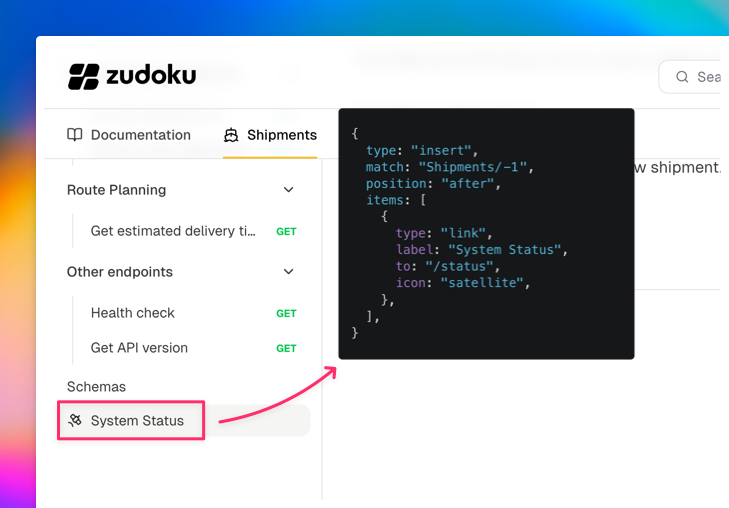
Inserting a link after the last sidebar item

Modifying items

Use type: "modify" to change properties of existing sidebar items like their icon, label, or collapsed state:

Code
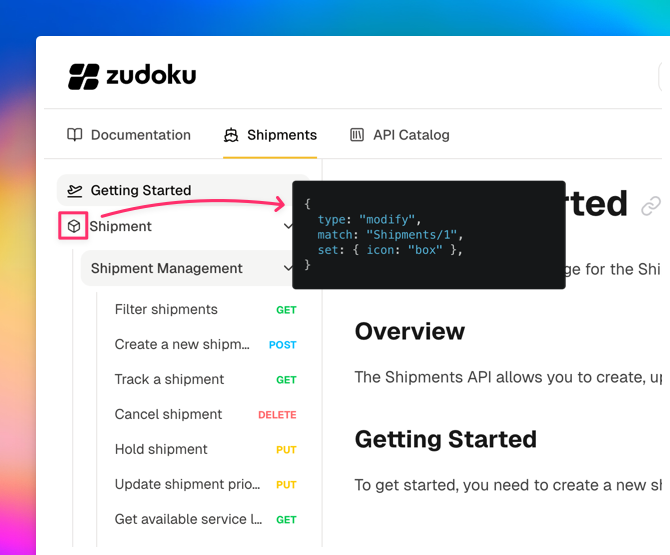
{ type: "modify", match: "Shipments/Shipment Management", set: { icon: "box", collapsed: true }, }

Modifying a sidebar item's icon

Removing items

type: "remove" hides items from the sidebar. This is rarely needed since it's usually better to fix the underlying source, but can be useful as a quick workaround:

Code
{ type: "remove", match: "Shipments/Deprecated Endpoint", }

Sorting items

Use type: "sort" to reorder children of a category alphabetically or with any custom comparator:

Code
{ type: "sort", match: "Shipments", by: (a, b) => a.label.localeCompare(b.label), }

The by function receives two navigation items and works like a standard Array.sort comparator.

Moving items

Use type: "move" to relocate an existing item to a different position in the sidebar:

Code
{ type: "move", match: "Shipments/Track a Shipment", to: "Shipments/0", position: "before", }

This moves "Track a Shipment" to the top of the Shipments category. You can also move items between different levels, for example from inside a category to the root level.

Rule order

Rules are applied sequentially, so order matters. For example, sorting first and then inserting places the new item at an exact position in the already-sorted list. Inserting first and then sorting will sort the new item along with everything else.

Complete example

This is the configuration used in the Cosmo Cargo demo shown above:

Code
navigationRules: [ { type: "sort", match: "Shipments", by: (a, b) => a.label.localeCompare(b.label), }, { type: "insert", match: "Shipments/Shipment", position: "before", items: [ { type: "doc", file: "api-shipments/getting-started", icon: "plane-takeoff", }, ], }, { type: "insert", match: "Shipments/-1", position: "after", items: [ { type: "link", label: "System Status", to: "/status", icon: "satellite", }, ], }, { type: "modify", match: "Shipments/1", set: { icon: "box" }, }, ],

Match syntax reference

For the full match syntax including label matching, index selectors, and nested paths, see the Navigation Rules reference.

Last modified on March 31, 2026
API Keys and IdentitiesTransforming Operation Examples
On this page
  • Setup
  • Inserting docs
  • Adding links
  • Modifying items
  • Removing items
  • Sorting items
  • Moving items
  • Rule order
  • Complete example
  • Match syntax reference
React
React
React
React
React
React
React
React